Using Date in SwiftUI
Date formatting
Step 1: get the date from Date()
Step 2: Format the date using .formatted()
Date can be styled as : .complete, .abbreviated, .long, .numeric and .omitted (for no display).
Time can be styled as: .complete, .standard, .omitted, .shortened.
@state var dateCreated: Date()

dateCreated.formatted() // Jan 21, 2022, 4:03 PM
dateCreated.formatted(date: .complete, time: .omitted) // Sunday,
January 22, 2023
dateCreated.formatted(date: .omitted, time: .complete) // 4:03:12 PM CST
dateCreated.formatted(date: .long, time: .shortened) // January 22, 2019, 4:03 PM
dateCreated.formatted(date: .abbreviated, time: .standard) // January 22, 2019, 4:03:12 PM
dateCreated.formatted(date: .numeric, time: .complete) // 1/22/2023, 4:03:12 PM CST
Getting specific time period of a date
Text("Week of the year: " + Date().formatted(.dateTime.week()))
Text("Week of the month: " +  Date().formatted(.dateTime.week(.weekOfMonth)))
Text("Weekday: " + Date().formatted(.dateTime.weekday()))
Text("Current year" + Date().formatted(.dateTime.year()))
Using DatePicker component
DatePicker provide a view of a calendar and optionally a time. This view is bound to a date instance (Date()).
The DatePicker takes two parameters:
-
A text, usually the title for the calendar
-
The @State value bound to the date instance
DatePicker("Title", selection: $variable)Example:
@State private var dateTime = Date()
DatePicker("Enter your birthday", selection: $dateTime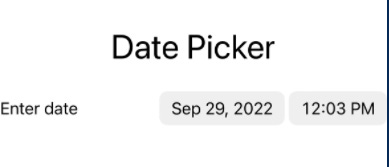
DatePicker can also be written as:
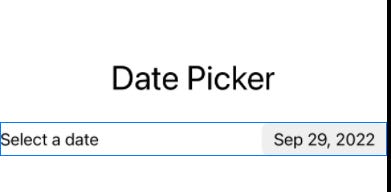
DatePicker(selection: $dateTime, in: ...Date(), displayedComponents: .date) {
   Text("Select a date")
}
This takes as parameter:
-
selection: a state value bound to Date()
-
in:
-
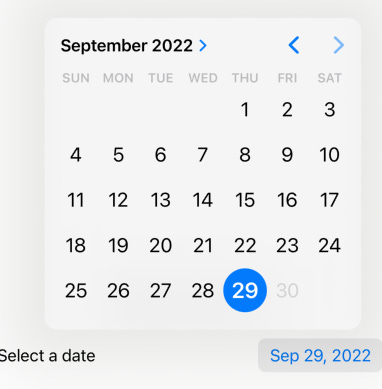
…Date() : choose a date up to now
-
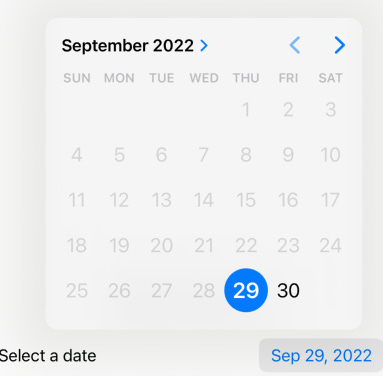
Date()… : choose a date from now onwards
-
-
displayedComponents: takes either date or hours and mins
-
.date

-
.hourAndMinute
-

Styling date picker
-
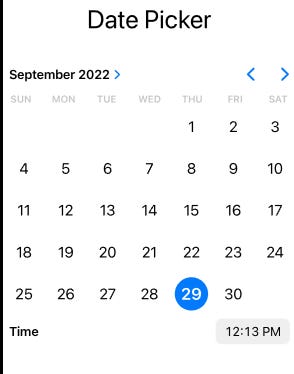
GraphicalDatePickerStyle(): displays an interactive calendar or clock.
-
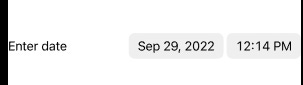
CompactDatePickerStyle(): displays the components in a compact, textual format
-
FieldDatePickerStyle(): displays the components in an editable field.
-
StepperDatePickerStyle(): displays the components in an editable field, with adjoining stepper that can increment/decrement the selected component.
-
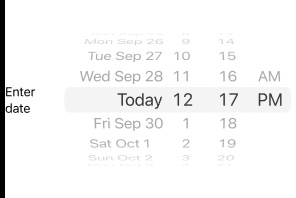
WheelDatePickerStyle(): displays each component as columns in a scrollable wheel.
Getting specific date
To get current date in the format "yyyy-MM-dd HH:mm:ss"
let date = Date()
let format = DateFormatter()
format.dateFormat = "yyyy-MM-dd HH:mm:ss"
let formattedDate = format.string(from: date)
print(formattedDate)
To get current day, month, year: use Calendar class
let calendar = Calendar.current
calendar.component(.year, from: date)
calendar.component(.month, from: date)
calendar.component(.day, from: date)
calendar.component(.weekday, from: date)
All returns integer values, i.e, if the month is September .month would return 9, or It will return 1 when it is in Sunday as in Gregorian Calendar.
Note: .current may give unexpected results if the device is set the a different calendar (like .hebrew). Use Calendar(identifier: .gregorian)
let year = Calendar(identifier: .gregorian).dateComponents([.year], from: Date()).year

// iOS 15+
let year = Calendar(identifier: .gregorian).dateComponents([.year], from: .now).year
Returning a new date from a specific date
Calendar.current.date(byAdding: .day, value: 1, to: oldTime ?? Date())This method takes three parameters:
-
the unit to add (in this case
.day) -
the value to add (in this case
1, which means we are adding 1 day to theoldTime) -
the starting date (in this case
oldTime ?? Date(), which means ifoldTimeisniluse the current date and time)
The method returns a new date representing the result of adding the specified value of the given unit to the given date.
Get all months of the current year
func getMonths() -> [String] {
   var months: [String] = []
   let currentYear = calendar.component(.year, from: Date())

   for month in 1...12 {
	let dateComponents = DateComponents(year: currentYear, month: month)
	if let date = calendar.date(from: dateComponents) {
		let monthFormatter = DateFormatter()
		monthFormatter.dateFormat = "MMMM"
		let monthName = monthFormatter.string(from: date)
		months.append(monthName)
	}//if
   }//for
	return months
}//getMonths